
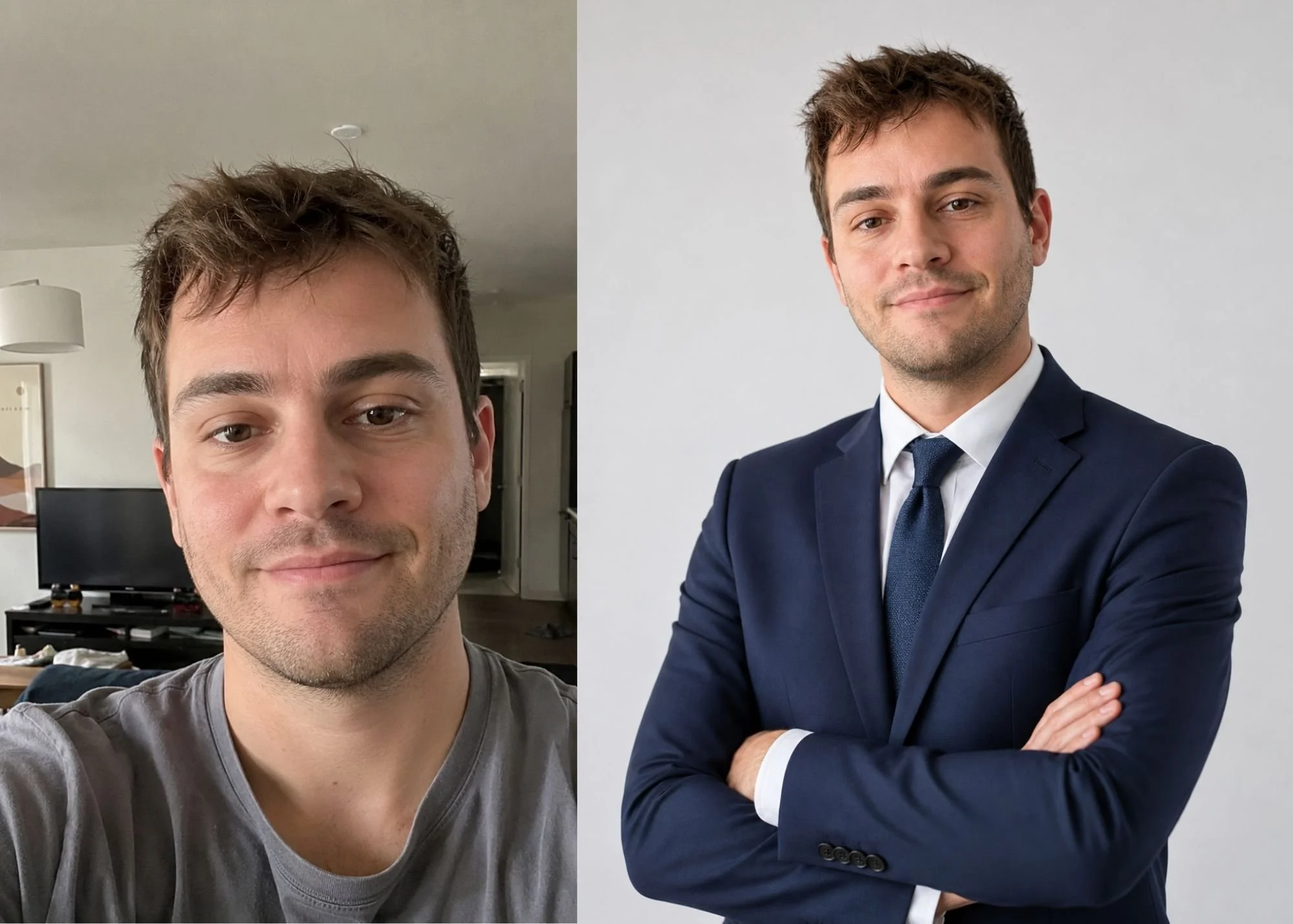
A professional headshot can make your LinkedIn profile, company bio, portfolio, or job application feel more polished—but you may not have time to schedule a studio photoshoot.
The good news is that you may already have what you need to get started: a few clear photos of yourself.
With the right reference images and the right process, casual phone photos can be used to create a completely new professional portrait.
Can You Really Create a Professional Headshot From Casual Photos?
Yes.
Your reference photos do not need to look professional themselves. Their main purpose is to provide accurate visual information about your appearance.
A good reference photo helps show:
Your facial features
Skin tone
Hairstyle
Facial proportions
Current appearance
Natural expressions
The professional elements—lighting, wardrobe, background, composition, camera perspective, and overall styling—can be created separately.
That means an ordinary photo taken at home can serve as the starting point for a polished professional headshot.
What Makes a Good Reference Photo?
Not every selfie is equally useful.
For the strongest results, choose photos that are:
Recent
Clear and in focus
Well lit
Free of heavy filters
Taken at a natural angle
Representative of how you currently look
If possible, provide more than one photo so your face can be seen from slightly different angles.
Avoid photos where your face is heavily covered by sunglasses, hair, shadows, or extreme filters.
You do not need perfect photos. You just need photographs that clearly show you.
What Should You Wear in a Professional Headshot?
Your wardrobe should match the type of work you are pursuing.
A financial professional may want a suit or structured business attire.
A therapist, consultant, designer, or tech professional may look more natural in polished business-casual clothing.
For a job-search headshot, the goal is usually to look like a professional version of yourself—not like you are wearing a costume for a role you would never actually have.
Good choices often include:
Blazers
Button-down shirts
Simple blouses
Sweaters
Structured jackets
Clean solid colors
Minimal patterns
Avoid clothing that distracts from your face.
What Kind of Background Works Best?
The background should support your professional image without competing for attention.
Common options include:
Clean Studio Background
Simple, polished, and appropriate for almost any industry.
Modern Office
Useful for corporate, consulting, finance, technology, or leadership roles.
Architectural Environment
Works well for real estate agents, designers, executives, and entrepreneurs.
Soft Natural Interior
Can feel approachable and professional for therapists, coaches, authors, and creative professionals.
The background does not have to exist in your original photo.
How Much Editing Is Too Much?
A professional headshot should still look like you.
That means avoiding unnecessary changes that make your appearance difficult to recognize.
Over-editing can include:
Excessively smooth skin
Changed facial proportions
Unrealistic teeth
Artificial-looking hair
Dramatic reshaping
Skin tones that do not match you
Excessive makeup
Unnatural body proportions
Professional polish should improve presentation without erasing the details that make you recognizable.
Skin should still have texture. Hair should still look like hair. Your features should still look like your features.
Should You Smile in a Job-Search Headshot?
There is no single correct expression.
A slight smile can feel warm and approachable.
A neutral expression can feel confident and serious.
The best expression depends on your profession and the impression you want to create.
For LinkedIn and most job searches, a relaxed expression with comfortable eye contact usually works better than an exaggerated smile or an overly formal expression.
What Makes a Headshot Look Professional?
Several small photographic decisions make a significant difference.
Camera Perspective
A professional portrait usually avoids the close wide-angle distortion common in selfies.
Lighting
Good lighting creates dimension without making the face overly bright, shiny, or harsh.
Composition
The crop should feel intentional and leave enough space around the face.
Eye Contact
Looking naturally toward the camera can make the portrait feel more engaging.
Styling
Hair, wardrobe, makeup, facial hair, and accessories should work together.
Realism
The final image should look believable enough that someone who meets you in person immediately recognizes you.
Can AI Help Create a Professional Headshot?
Yes.
AI-assisted imaging can be used to create a new portrait from reference photographs.
There is an important difference, however, between an automated headshot generator and a photographer-directed process.
An automated system may produce a large collection of images with limited individual direction.
A photographer-directed process uses AI as part of the image-making workflow while a photographer intentionally makes decisions about lighting, styling, composition, background, perspective, and professional presentation.
For job seekers who want more control over how they are represented, that distinction can matter.
Do Professional Headshots Help With a Job Search?
A headshot will not replace experience, qualifications, or a strong resume.
But where professional profile photos are appropriate—especially on LinkedIn, professional websites, speaker profiles, and company directories—a polished portrait can help your overall presentation feel intentional and current.
Your image should support your professional identity rather than distract from it.
What If Your Current Photos Are Outdated?
If your hairstyle, weight, wardrobe, or overall appearance has changed, use recent reference photos whenever possible.
Your professional headshot should represent the person someone would expect to meet today.
This is especially important when updating a LinkedIn profile before applying for new positions.
How to Prepare Your Photos
Before submitting reference images:
Choose your clearest recent photos.
Avoid beauty filters.
Include at least one straight-on view of your face.
Include another angle if available.
Decide what profession or role the portrait is for.
Think about the clothing and setting you want.
Identify anything you specifically do—or do not—want changed.
Clear direction usually produces a more intentional result.
A Professional Headshot Without the Studio Appointment
You do not necessarily need to schedule a traditional photography session just because you need an updated professional photo.
Existing phone photos can provide the visual reference needed to create a polished new portrait designed specifically for your job search, LinkedIn profile, website, or professional brand.
At Remote Photoshoots, clients submit clear reference images and describe the kind of professional portrait they need. Each finished image is created remotely and personally directed by an experienced portrait photographer.
AI is the tool. A photographer directs the portrait.
